


Doll PlayGround
3.2783.00 Reviews
App Specs
- Version
- 3.5.4.8
- Updated On
- License
- Free
- Downloads
- 10,000,000+
- Developer
- Tappy Game
- Categories
- Simulation
- Platform
- Android
Screenshots
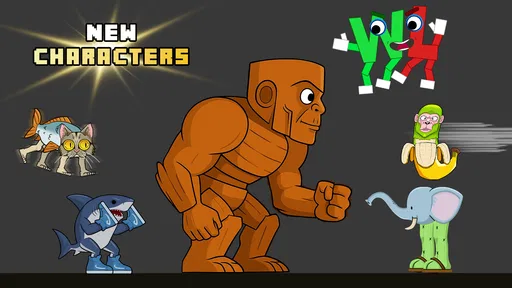
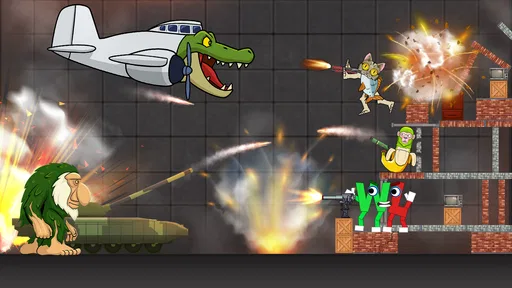
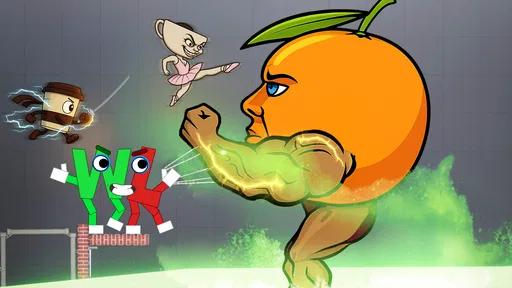
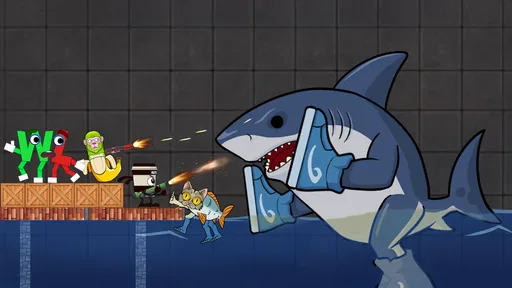
 Analysis by AppCompare
I tested Doll PlayGround as a casual simulation game built around ragdoll experimentation, and my first impression was that it is less about reaching a traditional goal and more about creating short, strange scenarios. The appeal comes from watching the doll react to whatever situation I set up, then adjusting the scene to see what happens next. That makes it easy to pick up for a few minutes, especially on a shared phone or tablet where different people can take turns without needing a long campaign.
The game is free to install and comes from Tappy Game. It has attracted over ten million installs, while its average score sits at 3.2 from roughly thirteen thousand ratings. Those numbers tell me something useful: there is clearly curiosity around the concept, but the experience is not universally satisfying. I can understand both sides. The sandbox idea is immediately accessible, yet its enjoyment depends heavily on whether you like open-ended physics play rather than structured missions, progression, or a polished story.
How Doll PlayGround works in a shared household
When I think about Doll PlayGround in a shared household, I’d treat it as a quick-turn activity rather than a game that everyone needs to follow continuously. Agreeing on who gets to change the scene, and when to reset it, keeps the experience fair and makes each person’s experiment easier to understand. That simple routine also helps set up a more useful question: what makes a short session worth starting again?
A game that suits short turns
In my experience, the strongest household use case is a quick pass-and-play session. One person creates a setup, another changes it, and a third watches the result. Because the core attraction is experimentation, nobody has to remember a complicated objective before taking a turn. A younger player might focus on arranging the doll and objects, while an older player may be more interested in testing how the scene responds to repeated changes.
That flexibility is more valuable than it sounds. Many simulation games ask one user to invest time in building a world, collecting resources, or learning a detailed control system. Here, the appeal is closer to a digital toy box. I can open it when I have a spare moment, try one idea, and stop without feeling that I have abandoned a larger task. On a family device, that makes it easier to share the game casually rather than treating it as one person’s ongoing save.
There is also a useful social rhythm to the ragdoll format. The result is often more entertaining when someone else is watching, because the surprise comes from the movement and the unexpected outcome. I found that the best sessions were not necessarily the longest ones. A few deliberate experiments usually worked better than repeatedly tapping around without a plan.
Why the sandbox can feel different from ordinary simulation games
Traditional simulation games usually reward management. You might run a business, build a town, care for virtual characters, or improve a collection. Doll PlayGround takes a looser route. Its “simulation” identity comes from manipulating a physical scene rather than managing a long-term system. That distinction matters when deciding whether it is right for you.
Worth Reading Before You Choose

EA SPORTS FC Mobile 26 Is a Bigger Football Game, but It Takes Time

Flipboard Shows What News Apps Must Do Beyond the Feed

Switching to Android Auto Means Rethinking Your Driving Routine

Google Calendar Makes a Crowded Week Easier to Manage

Ludo King Makes the Most of the Minutes Between Plans

Baby Panda World Brings Quick Play to Modern Phones, but Its Game Library Feels Busy
If you enjoy games with objectives, unlocks, missions, or a clear sense of improvement, this may feel thin. The satisfaction here is self-directed. I have to invent the reason to keep playing, whether that means arranging a funny scene, testing a new interaction, or simply observing the ragdoll response. Players who enjoy physics sandboxes will understand the appeal quickly; players who need explicit rewards may lose interest just as quickly.
Compared with a conventional toy-style sandbox, the ragdoll focus gives this game a more unpredictable edge. The doll’s reactions can make a simple setup feel active instead of static. At the same time, that unpredictability is not always a strength. When I wanted a precise result, the physics-style behavior could make the experiment feel messy rather than clever.
Setting boundaries before handing over the device
The age context deserves attention. The game carries a Teen content rating, and the central concept involves ragdoll mutilation. That does not automatically make it unsuitable for every teenager, but it does mean I would not hand it to a child without first checking whether the tone fits the household. Parents and guardians should look at the actual presentation on the device and decide based on the child’s maturity, sensitivity, and understanding of fictional game violence.
This is especially important when the game is installed on a device used by several age groups. A younger child may interpret the activity as harmless doll manipulation, while an older player may deliberately explore the darker side of the premise. Those are different experiences even though they happen inside the same app. I would set expectations before sharing it: this is a fictional sandbox, not a caring or nurturing doll game, and some scenes may be uncomfortable.
The game does not need to become a household argument if everyone understands the boundary. I would introduce it to a teenager first, watch how they respond, and decide whether shared play is appropriate. For a younger child, I would choose a gentler simulation or creative sandbox instead. The important point is not to assume that a cartoon-like presentation makes the content automatically suitable for all ages.
Account separation and shared-device habits
One practical issue with a shared device is knowing who is responsible for changes made inside the game. Since the experience encourages experimentation, a person can leave a scene in a very different state from the one they found. If several people use the same phone or tablet, I recommend agreeing on a simple routine: finish a session, return the scene to a neutral state if possible, and tell the next player what has changed.
I would also avoid treating the game as a private personal space when it is installed on a household device. A shared screen means that another user may see the current scene immediately. That is not a technical feature or a privacy promise; it is simply a sensible expectation for any app used by multiple people. If one player wants a more personal experience, using their own device is the cleaner arrangement.
The free entry point makes casual sharing easy, but the game includes in-app purchases ranging from $0.99 to $29.99 per item. For a family device, that is the part I would address before play begins. I would make sure the person using the game understands that “free” refers to the initial price, not necessarily every optional item inside it. A clear household rule about purchases prevents a five-minute experiment from becoming an unwanted billing problem.
Coordinating turns without making play feel like homework
Because the game is open-ended, coordination works best when it stays informal. I would not create a strict schedule for it. Instead, I would use short turn limits or a simple “one experiment each” rule when several people want to play. That keeps the sandbox moving and reduces the chance that one user occupies the device while everyone else waits.
A useful approach is to give each player a different role. One person can arrange the scene, another can suggest a change, and a third can observe the result. This turns a solitary physics toy into a small group activity without pretending that the game contains built-in multiplayer coordination. It also helps younger or less confident users participate, because they can contribute an idea before they need to control everything themselves.
I found that verbal planning improves the experience more than random tapping. Before touching the controls, decide what the scene is supposed to test. Is the goal to see how the doll reacts to a particular arrangement, to create a visual joke, or simply to compare two setups? Having a question in mind makes the sandbox feel more purposeful and exposes one of its hidden trade-offs: the game gives freedom, but the player has to supply the structure.
Reading the controls and managing frustration
New players should expect a little trial and error. A ragdoll sandbox is usually less predictable than a menu-driven simulation, and the fun depends on understanding how actions affect the scene. I recommend beginning with small changes rather than filling the space with activity immediately. That makes it easier to identify which adjustment caused a result.
For shared use, this gradual approach also prevents one player from overwhelming the next person with a chaotic setup. If the scene becomes difficult to read, starting over is often more productive than trying to rescue every detail. The game’s main value is experimentation, not preservation of a perfect arrangement.
Another practical tip is to treat unexpected results as information rather than failure. If the doll does not respond as expected, repeat the setup once, then change only one element. That simple workflow makes comparisons possible. It is a more rewarding way to play than changing several things at once and then guessing what caused the difference.
Performance expectations and keeping the experience comfortable
The current version is 3.5.4.8, and the game supports devices running Android 7.0 or later. That broad compatibility makes it a realistic candidate for an older household Android device, provided the device still handles modern games comfortably. I would not judge the experience only by the operating-system requirement, though. A compatible device can still feel less pleasant if the screen is small, the controls are cramped, or the hardware struggles with a busy scene.
For a family tablet, the larger display is likely a better fit than a small phone because several people can watch the setup and result together. On a phone, the game is more naturally a personal break-time activity. That difference changes the social experience: tablet play invites discussion, while phone play favors quick private experiments.
I also recommend closing the game when handing the device to someone who needs it for another purpose. This is ordinary shared-device etiquette, but it matters more with a physics sandbox because leaving an active scene open can make the next user think the device is behaving unexpectedly. A clean handoff keeps the game from becoming a source of confusion.
Who should try it, and who should skip it
I would recommend Doll PlayGround to players who enjoy digital toys, ragdoll physics, and self-directed experiments. It is a good match for someone who likes making small scenes, watching unpredictable reactions, and sharing amusing results with friends or family. It can also work for a teenager who wants something less demanding than a competitive game and does not need a campaign to stay interested.
I would skip it if you are looking for a calm doll-care experience, a construction game with dependable progress, or a simulation with a strong narrative. The Teen rating and mutilation-focused premise are also clear reasons to choose another title for younger children or sensitive players. Likewise, anyone who dislikes repeating experiments without a formal reward loop may find the sandbox’s freedom more empty than liberating.
Compared with a management simulation, this game asks less planning over time but more imagination in the moment. Compared with a creative building game, it may provide quicker reactions but less satisfaction from constructing something lasting. Compared with a physics puzzle game, it offers more freedom but fewer clearly defined problems to solve. Those trade-offs explain its mixed reception better than the install count alone: the concept is easy to understand, but the ideal audience is fairly specific.
What the pricing means for a household
The initial download is free, which lowers the barrier for trying it together. That is helpful when you are unsure whether the ragdoll concept will appeal to everyone in the home. You can test the basic experience before deciding whether it deserves a permanent place on a shared device.
However, the optional purchases should be part of the conversation from the start. The listed range reaches from $0.99 to $29.99 per item, so I would not let a child explore the purchase screens without supervision. Even when nobody intends to buy anything, a shared device benefits from a clear rule: ask first, and never assume that an item is included because the game itself cost nothing to install.
For me, the best value comes from using the free portion as a short-form sandbox rather than chasing every possible addition. If the basic interactions already provide enough variety for your household, there is no need to spend money simply to make the game feel complete. If the free experience feels repetitive, purchasing more content may not solve the underlying issue, because the main limitation could be the open-ended format itself.
My household verdict
After spending time with it, I see Doll PlayGround as a niche but understandable recommendation. Tappy Game has built a game around immediate ragdoll experimentation, and that makes it easy to demonstrate, easy to share for a few minutes, and easy to abandon when the novelty fades. Its strongest quality is the freedom to create a situation without following a mission. Its weakest quality is the same freedom: without personal ideas or group interaction, there may not be enough direction to hold attention.
For a shared household device, I would use it with clear age expectations, agreed purchase boundaries, and short turns. I would introduce it to teenagers rather than younger children because of the Teen rating and the mutilation theme. I would also choose a tablet over a small phone when the goal is group play, while keeping a personal phone session brief and experimental.
My final recommendation is cautious but positive for the right audience. Try the free version if you enjoy physics sandboxes and want a game that can produce quick, unpredictable scenes. Skip it if you want nurturing doll play, structured progression, or a gentler family experience. The average rating of 3.2 reflects that divide fairly well: this is not an all-purpose simulation, but for players comfortable with its unusual premise, the best way to enjoy it is to treat it as a shared experiment rather than a conventional game.
Pros
- Creative doll customization with many outfits
- hairstyles
- and accessories.
- Simple touch controls make it easy for children to explore independently.
- Encourages imaginative storytelling through open-ended play scenarios.
- Bright visuals and friendly characters are appealing to younger players.
- Offers relaxing gameplay without difficult challenges or time limits.
Cons
- Some customization items may require watching ads or making purchases.
- Gameplay can feel repetitive after exploring the available locations.
- Limited interaction depth may disappoint older children and adults.
- Ads can interrupt play
- depending on the device and app version.
- May require extra storage space for downloaded content and updates.
FAQs for Doll PlayGround
What is Doll PlayGround and what can you do in the app?
Doll PlayGround is a creative dress-up and doll customization experience where you can style characters, choose outfits, change hairstyles, apply accessories, and create different visual scenes. It is mainly designed for casual play and self-expression rather than competitive gameplay. After experimenting with the available items and backgrounds, users can usually save or share their creations, depending on the device version and the permissions enabled.
Is Doll PlayGround free to download and play?
Doll PlayGround can generally be downloaded for free, but the exact monetization model may vary between Android and iOS versions. Some clothing, accessories, characters, or customization options may be available only after watching advertisements or using in-app purchases. Before downloading, it is worth checking the store listing for current pricing, subscription details, and whether the game includes optional purchases that could affect the overall experience.
Does Doll PlayGround require an internet connection?
The basic customization features may work without a permanent internet connection, which makes Doll PlayGround convenient for short creative sessions while traveling or when mobile data is unavailable. However, certain elements may depend on connectivity, including advertisements, additional content, cloud features, sharing tools, or updates. The exact offline functionality can differ by platform, so users should test the app after installation rather than assume every feature works offline.
Is Doll PlayGround suitable for children?
Doll PlayGround may appeal to children because of its colorful characters, simple controls, and fashion-focused creative activities. Nevertheless, parents should review the age rating and privacy information before installation. Advertisements, external links, social sharing, or in-app purchases may be present depending on the version. It is also advisable to enable parental controls and supervise younger users, especially if the device is connected to a payment account.
Does Doll PlayGround collect personal data or include advertisements?
The app may use advertising or analytics services, meaning it could request permissions or collect certain technical information such as device details, usage activity, or advertising identifiers. The exact practices depend on the developer, operating system, and installed version. Before downloading, users should read the current privacy policy and store disclosures. Avoid granting unnecessary permissions, and remember that disabling personalized advertising may not remove all advertisements.


